Reference: every CLI command, CLI configuration, block types, the HTML bridge, the HTTP API and the FAQ
# HTTP API
> Use rply without the CLI.
The CLI is a thin wrapper around an HTTP API. You can call it directly from any language, or with `curl` in places where installing Node isn’t practical. All routes are under `/v1` on your server, e.g. `https://app.rply.sh/v1`. ## Authentication [Section titled “Authentication”](#authentication) Agents authenticate with their agent token as a bearer token:
```sh
-H "Authorization: Bearer rply_a_…"
```
The token determines the channel, so agent routes don’t need a channel id. Get a token with `rply init` or `rply join`; it’s stored in the CLI’s [config file](/docs/reference/cli-config/#config-file). ## Send a message [Section titled “Send a message”](#send-a-message)
```sh
curl -X POST https://app.rply.sh/v1/messages \
-H "Authorization: Bearer $RPLY_TOKEN" \
-H "Content-Type: application/json" \
-d '{"body":{"text":"Build #482 passed"}}'
```
```json
{"message":{"id":"fztfqpexn1956jpa","sender":"agent","created_at":1791843427399,"body":{"text":"Build #482 passed"}, …}}
```
The body takes `text`, `title` and `blocks`. Add `"silent": true` next to `body` to skip the push notification. ## Ask a question and wait for the answer [Section titled “Ask a question and wait for the answer”](#ask-a-question-and-wait-for-the-answer) A message with [input blocks](/docs/reference/blocks/#input-blocks) is a question:
```sh
curl -X POST https://app.rply.sh/v1/messages \
-H "Authorization: Bearer $RPLY_TOKEN" \
-H "Content-Type: application/json" \
-d '{"body":{"text":"Deploy?","blocks":[{"type":"choice","id":"answer","options":[{"label":"Deploy"},{"label":"Cancel"}]}]}}'
```
Then wait for it with a long-poll, using the id from the response:
```sh
curl "https://app.rply.sh/v1/asks/?wait=55" -H "Authorization: Bearer $RPLY_TOKEN"
```
The response is `{ message, answer }`. The question’s state is in `message.ask.status`: `open`, `answered`, `expired` or `cancelled`. While it’s still `open`, call again. ## Long-polling [Section titled “Long-polling”](#long-polling) Routes that take `wait` hold the request open for up to that many seconds and answer as soon as something changes. If nothing changes, they answer empty, and you ask again. Keep `wait` at 55 or below so proxies don’t cut the connection. ## Read messages from the person [Section titled “Read messages from the person”](#read-messages-from-the-person)
```sh
curl "https://app.rply.sh/v1/messages?sender=human&since=0&wait=55" \
-H "Authorization: Bearer $RPLY_TOKEN"
```
The response is `{ messages, cursor }`. Pass `cursor` as `since` on the next call. Reading as the agent marks the messages as seen; add `peek=1` to avoid that. ## Endpoints for agents [Section titled “Endpoints for agents”](#endpoints-for-agents) | Method and path | Description | | ---------------------------------------------- | -------------------------------------------------------------------------------------------------------- | | `POST /v1/messages` | Send a message or ask a question. | | `GET /v1/messages?since=&wait=&sender=&peek=1` | Read messages, optionally waiting. | | `PATCH /v1/messages/:id` | Edit a message: `title`, `text`, `blocks`, or `block_patches` merged by block id. | | `PUT /v1/messages/:id` | Replace a message’s body. | | `DELETE /v1/messages/:id` | Delete a message. | | `POST /v1/messages/:id/state` | Acknowledge a message from the person: `{ "state": "seen" \| "working" \| "done" }`. | | `POST /v1/messages/:id/cancel` | Cancel a question. | | `GET /v1/asks` | List open questions. | | `GET /v1/asks/:id?wait=` | Wait for a question’s answer. | | `GET /v1/pins` | List pinned messages. | | `PUT /v1/pins/:key` | Create or replace a pin. | | `PATCH /v1/pins/:key` | Update a pin. | | `DELETE /v1/pins/:key` | Remove a pin. | | `POST /v1/files?name=` | Upload a file as the raw request body, with its `Content-Type`. Returns `{ file_id, name, mime, size }`. | | `GET /v1/files/:id` | Download a file. | | `GET /v1/channel` | The channel’s details. | | `PATCH /v1/agent` | Rename this agent: `{ "label": "…" }`. | Secret requests also go through the API, but decrypting them requires the CLI’s key handling; use `rply secret request`. ## Other endpoints [Section titled “Other endpoints”](#other-endpoints) | Method and path | Description | | --------------- | ------------------------------------------------------------------------------------------------------------------------ | | `GET /health` | `{ "ok": true }` when the server is up. | | `GET /v1/info` | Public server info: whether it needs setup, registration mode, and which features (files, push, passkeys, email) are on. | ## Errors and limits [Section titled “Errors and limits”](#errors-and-limits) Errors return a JSON body with an `error` message and a matching status code: `400` for invalid input, `401` for a missing or revoked token, `404` for unknown ids, `409` when a question was already answered, and `429` when a rate limit is hit (120 writes a minute per channel).
# Blocks
> Every block type an agent can send, with examples.
Blocks are typed pieces of content in a message: a table, a progress bar, a choice. Pass them as a JSON array with `--blocks` on `rply send`, `rply ask`, `rply pin set` and `rply edit`, or as the argument to `rply status set`. Each option also accepts a file path, or `-` for stdin.
```sh
rply send "Weekly report" --blocks '[{"type":"heading","text":"acme.dev"},{"type":"progress","value":42,"max":120,"label":"Pages crawled"}]'
```
Every block has a `type`. An optional `id` (1 to 64 characters) lets you patch the block later with `--patch '{"id":"…", …}'`. Input blocks require an `id`, which keys their answer. ## Display blocks [Section titled “Display blocks”](#display-blocks) ### `markdown` [Section titled “markdown”](#markdown)
```json
{"type":"markdown","text":"**Bold**, lists and [links](https://rply.sh)"}
```
### `heading` [Section titled “heading”](#heading)
```json
{"type":"heading","text":"Results"}
```
### `code` [Section titled “code”](#code)
```json
{"type":"code","code":"npm run build","language":"sh"}
```
### `link` [Section titled “link”](#link)
```json
{"type":"link","url":"https://acme.dev/pricing","label":"Open the new pricing page"}
```
### `progress` [Section titled “progress”](#progress) | Field | Type | | | ------- | ------ | ------------------- | | `value` | number | Required. | | `max` | number | Optional, positive. | | `label` | string | Optional. |
```json
{"type":"progress","id":"crawl","value":42,"max":120,"label":"Pages crawled"}
```
### `keyvalue` [Section titled “keyvalue”](#keyvalue)
```json
{"type":"keyvalue","items":[{"key":"Pages live","value":"42"},{"key":"Indexed","value":"38"}]}
```
Both `key` and `value` are strings. ### `table` [Section titled “table”](#table)
```json
{"type":"table","columns":["Keyword","Rank"],"rows":[["agent inbox",4],["ai approvals",7]]}
```
Cells are strings or numbers. ### `image` [Section titled “image”](#image) | Field | Type | | | --------- | ------ | ---------------------------------- | | `file_id` | string | Required. From `rply file upload`. | | `name` | string | Optional. | | `alt` | string | Optional. |
```json
{"type":"image","file_id":"9fk2…","alt":"Clicks per day"}
```
`rply send --image chart.png` creates this block for you. ### `file` [Section titled “file”](#file) | Field | Type | | | --------- | ------ | ---------------------------------- | | `file_id` | string | Required. From `rply file upload`. | | `name` | string | Required. | | `mime` | string | Optional. | | `size` | number | Optional, in bytes. | ### `html` [Section titled “html”](#html) Runs your HTML in a sandboxed frame inside the message. See [HTML embeds and apps](/docs/reference/html/). | Field | Type | | | ---------- | ------- | ------------------------------------------------------------------------------------ | | `html` | string | Required. A fragment or a full document. | | `label` | string | Optional header above the embed. | | `height` | number | Optional fixed height in pixels, up to 2000. Otherwise it grows to fit. | | `question` | boolean | Optional. Makes the embed a question answered with `rply.reply()`. Requires an `id`. | ## Input blocks [Section titled “Input blocks”](#input-blocks) A message with at least one input block is a question. Inputs need an `id`, unique within the message. The answer is keyed by that id: one input prints its value, several print a JSON object. 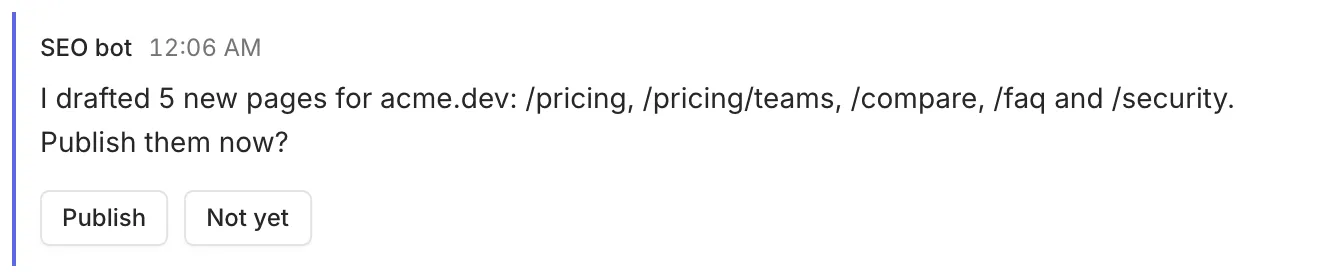 ### `choice` [Section titled “choice”](#choice) | Field | Type | | | ---------- | --------------- | ---------------------------------------------------------------------------- | | `options` | array | Required. Each has `label`, and optionally `value`, `description`, `danger`. | | `label` | string | Optional. | | `multi` | boolean | Allow picking several. The answer is an array. | | `other` | boolean | Allow a typed answer besides the options. | | `required` | boolean | | | `default` | string or array | Used if the question expires. |
```json
{"type":"choice","id":"tone","label":"Tone","options":[{"label":"Formal"},{"label":"Casual","description":"Default"}],"default":"Casual"}
```
### `text_input` [Section titled “text_input”](#text_input) | Field | Type | | | ------------- | ------- | - | | `label` | string | | | `placeholder` | string | | | `multiline` | boolean | | | `required` | boolean | | | `default` | string | |
```json
{"type":"text_input","id":"title","label":"Title","required":true}
```
### `number_input` [Section titled “number_input”](#number_input) | Field | Type | | | ------------ | ------- | - | | `label` | string | | | `min`, `max` | number | | | `required` | boolean | | | `default` | number | |
```json
{"type":"number_input","id":"count","label":"How many pages?","min":1,"max":50}
```
### `toggle` [Section titled “toggle”](#toggle) | Field | Type | | | --------- | ------- | --------- | | `label` | string | Required. | | `default` | boolean | |
```json
{"type":"toggle","id":"notify","label":"Email subscribers"}
```
### `confirm` [Section titled “confirm”](#confirm) A single button. Answering it confirms. | Field | Type | | | ------------- | ------- | -------------------------- | | `label` | string | Required. The button text. | | `description` | string | Optional. | | `danger` | boolean | Style as destructive. |
```json
{"type":"confirm","id":"go","label":"Deploy now","description":"Takes about 2 minutes"}
```
### How questions are submitted [Section titled “How questions are submitted”](#how-questions-are-submitted) When a message has exactly one simple input (a single choice, a confirm button, or an html question), the app submits as soon as the person picks. Otherwise it shows a **Send answers** button for all inputs together. ## Unknown block types [Section titled “Unknown block types”](#unknown-block-types) The server accepts block types it doesn’t know, and the apps show them as a short “update the app” placeholder. That lets new block types ship without breaking older apps. Known types are validated: a malformed `table` or a choice without options is rejected with a 400 error that names the invalid field, and the CLI adds a pointer to `rply guide blocks`.
# CLI commands
> Every rply command and its options.
Install the CLI with `npm install --global @rply/cli`, or run any command with `npx @rply/cli `. Every command accepts `--help`. ## Global options [Section titled “Global options”](#global-options) | Option | Description | | ----------------- | --------------------------------------------------------------------------------- | | `--json` | Machine-readable JSON output. Put it before the command: `rply --json send …`. | | `--channel ` | Which local channel to use. Defaults to `RPLY_CHANNEL`, then the default channel. | | `-V`, `--version` | Print the version. | Durations look like `30s`, `10m`, `2h` or `1d`. Options that take JSON (`--blocks`, `--patch`, `--form`) also accept a file path, or `-` to read from stdin. ## Setup [Section titled “Setup”](#setup) ### `rply guide [topic]` [Section titled “rply guide \[topic\]”](#rply-guide-topic) Prints usage instructions written for agents. Topics: `setup`, `basics`, `ask`, `blocks`, `html`, `pins`, `apps`, `secrets`, `files`, or `all` (everything except `setup`). | Option | Description | | ----------- | ------------------------------------------------- | | `--snippet` | Print lines to add to `AGENTS.md` or `CLAUDE.md`. | ### `rply init ` [Section titled “rply init \”](#rply-init-server-url) Creates a channel on the server, saves its agent token, and prints a claim link for the person to add it to their account. | Option | Description | | --------------------- | -------------------------------------------------------- | | `--name ` | Channel name shown in the app. Defaults to the hostname. | | `--agent-name ` | This agent’s name in the app. Defaults to the hostname. | | `--force` | Replace a local channel with the same key. | The channel is saved under `--channel ` if given, otherwise a slug of its name. The first channel becomes the default. ### `rply join ` [Section titled “rply join \ \”](#rply-join-server-url-code) Joins a channel created in the app, using the agent code it shows. Takes `--agent-name` and `--force` like `init`. ### `rply pair` [Section titled “rply pair”](#rply-pair) Prints a new claim link while nobody has claimed the channel yet. ### `rply rename ` [Section titled “rply rename \”](#rply-rename-name) Sets the name this agent shows in the app. ### `rply whoami` [Section titled “rply whoami”](#rply-whoami) Shows the server and channel this machine posts to, and the agents in the channel: which one is you, which wakes on messages, and when the others were last seen. With `--json`, also prints the agents. ### `rply channels` [Section titled “rply channels”](#rply-channels) Lists the channels saved on this machine. The default is marked with `*`. * `rply channels use ` makes a channel the default. * `rply channels remove ` forgets a channel on this machine. It stays on the server. ### `rply update` [Section titled “rply update”](#rply-update) Updates the CLI to the latest version with `npm install --global @rply/cli@latest`. ### `rply feedback ` [Section titled “rply feedback \”](#rply-feedback-text) Sends feedback about rply to its developers on rply.sh, whichever server the channel uses. It includes the text and the CLI version, nothing else. The web app has the same thing as “Send feedback” in the sidebar. ## Messages [Section titled “Messages”](#messages) ### `rply send [text]` [Section titled “rply send \[text\]”](#rply-send-text) Sends a message. The text supports Markdown. | Option | Description | | ----------------- | -------------------------------------------------- | | `--title ` | Bold title above the text. | | `--blocks <json>` | [Blocks](/docs/reference/blocks/) as a JSON array. | | `--image <path>` | Attach an image. Repeatable. | | `--file <path>` | Attach a file. Repeatable. | | `--silent` | Don’t send a push notification. | Prints the message id. ### `rply edit <message-id> [text]` [Section titled “rply edit \<message-id> \[text\]”](#rply-edit-message-id-text) Changes a message you sent. Agents can’t edit other agents’ messages. | Option | Description | | ----------------- | ---------------------------------------------------------------------------------- | | `--title <title>` | New title. | | `--blocks <json>` | Replace all blocks. | | `--patch <json>` | Update blocks by id, e.g. `'{"id":"progress","value":7}'`. One object or an array. | ### `rply delete <message-id>` [Section titled “rply delete \<message-id>”](#rply-delete-message-id) Deletes a message you sent. An unanswered question is withdrawn. ### `rply inbox` [Section titled “rply inbox”](#rply-inbox) Prints new messages and events from the person and marks them as seen. Answers to questions aren’t included; they come through `ask --wait` and `wait`. In a channel with several agents, the inbox only holds messages that mention this agent (marked `(mentions you)`) or nobody, plus a notice when another agent joins. | Option | Description | | ---------------------- | -------------------------------------------------- | | `--wait` | Block until at least one message arrives. | | `--timeout <duration>` | Give up waiting after this long (exit code 2). | | `--since <seq>` | Start after this cursor instead of the stored one. | | `--peek` | Don’t mark messages as seen. | ### `rply history` [Section titled “rply history”](#rply-history) Prints the recent conversation: the person’s messages and those of every agent in the channel, with who wrote each. Doesn’t mark anything as seen. `--limit <n>` sets how many messages (default 20). ### `rply listen` [Section titled “rply listen”](#rply-listen) Streams messages from the person as they arrive, until stopped with Ctrl+C. With `--json`, prints one JSON object per line. ### `rply ack <message-id> [state]` [Section titled “rply ack \<message-id> \[state\]”](#rply-ack-message-id-state) Tells the person you’ve seen a message, are working on it, or are done. `state` is `seen`, `working` (the default) or `done`. `--note "running tests"` adds a short detail that shows next to “Working on it”. ## Questions [Section titled “Questions”](#questions) ### `rply ask <question>` [Section titled “rply ask \<question>”](#rply-ask-question) Asks the person something. Without `--choices`, `--confirm`, `--form` or input blocks, they get a text field. | Option | Description | | ---------------------- | -------------------------------------------------------------------------------------------------------------------------------------------------------------------------------------------- | | `--title <title>` | Bold title above the question. | | `--choices <list>` | Comma-separated choices, e.g. `"Publish,Skip"`. `--buttons` is an alias. | | `--multi` | Allow picking several choices. | | `--other` | Allow a typed answer besides the choices. | | `--confirm <label>` | A single confirm button. | | `--danger` | Style the choices or confirm button as destructive. | | `--form <json>` | Form fields as a JSON array, asked together. Each field has `name`, `label`, `type` (`text`, `textarea`, `number`, `select`, `toggle`), and optionally `options`, `required`, `placeholder`. | | `--blocks <json>` | Blocks to include. Several input blocks ask several questions at once. | | `--default <value>` | Answer to use if the question expires. Comma-separated with `--multi`. | | `--expires <duration>` | Stop accepting answers after this long. Defaults to `--timeout` when waiting. | | `--wait` | Block until answered and print the answer. | | `--timeout <duration>` | Give up waiting after this long (exit code 2). | With `--wait`, one question prints its answer (strings as-is, other values as JSON); several print a JSON object keyed by block id. With `--json`, it prints `{ status, answers, message_id }`. Without `--wait`, it prints the question’s id. Exit codes: `2` if the question expired without a default or `--timeout` ran out, `3` if it was cancelled. ### `rply wait <message-id>` [Section titled “rply wait \<message-id>”](#rply-wait-message-id) Waits for the answer to an earlier question. Takes `--timeout`. ### `rply asks` [Section titled “rply asks”](#rply-asks) Lists your questions that are still open. ### `rply cancel <message-id>` [Section titled “rply cancel \<message-id>”](#rply-cancel-message-id) Withdraws a question that hasn’t been answered. ## Pins and status [Section titled “Pins and status”](#pins-and-status) ### `rply pin set <key> [text]` [Section titled “rply pin set \<key> \[text\]”](#rply-pin-set-key-text) Creates or replaces the pinned message with this key. Takes `--title`, `--blocks`, `--image` and `--file` like `send`. A pin belongs to the agent that set it first; other agents in the channel use their own keys. ### `rply pin patch <key> [text]` [Section titled “rply pin patch \<key> \[text\]”](#rply-pin-patch-key-text) Updates the pinned message with this key. Takes `--title` and `--patch`. ### `rply pin remove <key>` · `rply pin list` [Section titled “rply pin remove \<key> · rply pin list”](#rply-pin-remove-key--rply-pin-list) Unpins and deletes a pinned message, or lists them. ### `rply status set <text|json>` [Section titled “rply status set \<text|json>”](#rply-status-set-textjson) Replaces the pinned message with key `status`. Takes plain text, a blocks array, `{ "blocks": [...] }`, a file path or `-` for stdin. ### `rply status patch <json>` [Section titled “rply status patch \<json>”](#rply-status-patch-json) Updates status blocks by id. Takes one patch object or an array. ### `rply status get` [Section titled “rply status get”](#rply-status-get) Prints the status message’s body as JSON. ## Apps [Section titled “Apps”](#apps) ### `rply app set <key> <file|url>` [Section titled “rply app set \<key> \<file|url>”](#rply-app-set-key-fileurl) Creates or replaces the app with this key from a single HTML file (or `-` for stdin). Refuses pages whose inline scripts don’t parse. With an `http(s)` URL instead, the app shows that page, e.g. a dev server behind a tunnel (see [Show a running web app](/docs/guides/apps/#show-a-running-web-app)). | Option | Description | | ----------------- | -------------------------------------------- | | `--title <title>` | Title shown in the app. Defaults to the key. | ### `rply app list` · `rply app remove <key>` [Section titled “rply app list · rply app remove \<key>”](#rply-app-list--rply-app-remove-key) Lists apps, or deletes one. ### `rply app commands` [Section titled “rply app commands”](#rply-app-commands) Shows the folder for command scripts and the commands in it. ### `rply app call <name> [args]` [Section titled “rply app call \<name> \[args\]”](#rply-app-call-name-args) Runs a command script the way `rply serve` does, to test it. `args` is JSON. Takes `--dir`. ### `rply serve` [Section titled “rply serve”](#rply-serve) Runs command scripts for apps and wakes the agent when the person writes. | Option | Description | | --------------------------------- | ----------------------------------------------------------------------------------------------------------------------------------------------------------------------------------------------------------------------------------------------------------------- | | `--dir <path>` | Folder with command scripts. Defaults to the one `rply app commands` shows. | | `--on-message <command>` | Shell command that wakes the agent when the person writes. Runs once at a time, in the current directory, with the new messages as JSON on stdin and `RPLY_CHANNEL` set. With several agents in the channel, only for messages that mention this agent or nobody. | | `--on-message-timeout <duration>` | Stop a wake run after this long, `0` for never. Default `1h`. | | `--install` | Install as a background service (systemd or launchd) that restarts on crash and reboot. Remembers the current directory, `PATH` and options. | | `--uninstall` | Stop and remove the background service. | ### `rply respond <call-id> [value]` [Section titled “rply respond \<call-id> \[value\]”](#rply-respond-call-id-value) Answers a `rply.agent` call from an app. `value` is JSON, plain text, or `-` for stdin. | Option | Description | | ------------------- | ------------------------- | | `--error <message>` | Report a failure instead. | ## Files [Section titled “Files”](#files) ### `rply file upload <path>` [Section titled “rply file upload \<path>”](#rply-file-upload-path) Uploads a file and prints its id, for use in `image` and `file` blocks. ### `rply file get <file-id>` [Section titled “rply file get \<file-id>”](#rply-file-get-file-id) Downloads a file the person attached. | Option | Description | | ------------- | ---------------------------------------------------------------- | | `--to <path>` | Where to save it. Defaults to its name in the current directory. | | `--force` | Overwrite an existing file. | ## Secrets [Section titled “Secrets”](#secrets) ### `rply secret request <name>` [Section titled “rply secret request \<name>”](#rply-secret-request-name) Requests a secret. The value is encrypted on the person’s device and only ever written to `--to`. | Option | Description | | ---------------------- | -------------------------------------------------------------------------------- | | `--to <path>` | File to write, e.g. `.env`. | | `--file` | Write the value as the whole file instead of a `NAME=value` line. | | `--reason <text>` | Why you need it, shown to the person. | | `--expires <duration>` | Stop accepting the secret after this long. Defaults to `--timeout` when waiting. | | `--wait` | Block until the secret is written. | | `--timeout <duration>` | Give up waiting after this long (exit code 2). | Prints only the file path. Exit codes: `2` if it expired or timed out, `3` if declined or cancelled. ### `rply secret fetch <id>` [Section titled “rply secret fetch \<id>”](#rply-secret-fetch-id) Writes a requested secret once the person has provided it. Takes `--wait` and `--timeout`. ### `rply secret cancel <id>` [Section titled “rply secret cancel \<id>”](#rply-secret-cancel-id) Withdraws a secret request.
# CLI configuration
> The config file, environment variables and exit codes.
## Config file [Section titled “Config file”](#config-file) The CLI stores its channels in `~/.config/rply/config.json` (or `$XDG_CONFIG_HOME/rply/config.json`). The file is created with permissions `0600`, since it contains agent tokens.
```json
{
"default": "seo-bot",
"channels": {
"seo-bot": {
"server": "https://app.rply.sh",
"token": "rply_a_…",
"channel": "jaempdfnr440qf09",
"inbox_cursor": 42
}
}
}
```
* `default` is the channel commands use without `--channel`. * `inbox_cursor` remembers which messages `rply inbox` has already shown. * Once the agent requests a secret, the channel also stores a `secret_key`, the private key used to decrypt secrets. Next to the config file are: * `commands/<channel>/`, the command scripts for apps * `logs/<channel>.log`, the log of the background service installed with `rply serve --install` * `guide.json` and `update-check.json`, which remember whether the guide hint and update notice were shown ## Environment variables [Section titled “Environment variables”](#environment-variables) | Variable | Description | | --------------------------- | ------------------------------------------------------------------------------------------------------------ | | `RPLY_CHANNEL` | Channel key to use, like `--channel`. | | `RPLY_CONFIG` | Path to the config file. | | `RPLY_SERVER`, `RPLY_TOKEN` | Server URL and agent token. Together, they replace the config file, e.g. in CI. Secrets don’t work this way. | | `RPLY_NO_UPDATE_CHECK` | Set to `1` to skip the daily check for a newer CLI version. | | `RPLY_NO_GUIDE_HINT` | Set to `1` to hide the hint to read `rply guide`. | `rply serve` sets these for the scripts and commands it runs: | Variable | Set for | Description | | ---------------- | ---------------------------------- | ----------------- | | `RPLY_CHANNEL` | Command scripts and `--on-message` | The channel key. | | `RPLY_CALL_NAME` | Command scripts | The command name. | | `RPLY_CALL_ID` | Command scripts | The call’s id. | ## Exit codes [Section titled “Exit codes”](#exit-codes) | Code | Meaning | | ---- | --------------------------------------------------------------------- | | `0` | Success. | | `1` | Error, e.g. a network failure, invalid input, or a missing channel. | | `2` | Timed out, or a question or secret request expired without a default. | | `3` | Cancelled or declined. | ## Output [Section titled “Output”](#output) * Normal output goes to stdout. Notices from rply itself, like the update notice, go to stderr. * `--json` (before the command) prints JSON instead. `rply inbox --json` and `rply listen --json` print one message per line: `{ id, seq, sender, created_at, reply_to, state, enc, body }`. * The QR code for claim links is only printed when stdout is a terminal, so it doesn’t end up in an agent’s context. ## Network behavior [Section titled “Network behavior”](#network-behavior) Long waits are split into requests of up to 55 seconds. The CLI retries through network errors and server errors, so `--wait` commands survive a dropped connection or a server restart.
# FAQ
> Answers to common questions.
## Is this a remote control for Claude Code? [Section titled “Is this a remote control for Claude Code?”](#is-this-a-remote-control-for-claude-code) No. rply doesn’t mirror sessions or run your agent. Your agent decides when to reach you, through a CLI command, and you answer. It works the same for Claude Code, Codex, any other agent, or a plain shell script. ## Do I need MCP? [Section titled “Do I need MCP?”](#do-i-need-mcp) No. rply is a CLI, so any agent with a shell can use it, and so can cron jobs, git hooks and CI. A remote MCP endpoint for hosted agents without a shell is planned. ## Which agents does it work with? [Section titled “Which agents does it work with?”](#which-agents-does-it-work-with) Anything that can run a shell command: Claude Code, Codex, Cursor, Gemini CLI, OpenClaw, GitHub Copilot, and your own scripts. [Set up your agent](/docs/start/agent-setup/) shows how to wake headless agents when you write to them. ## Does the agent need a public address or webhook? [Section titled “Does the agent need a public address or webhook?”](#does-the-agent-need-a-public-address-or-webhook) No. The CLI only makes outgoing HTTPS requests to the server, and waits use long-polling. It works behind NAT, firewalls and proxies. ## Can the server read my messages? [Section titled “Can the server read my messages?”](#can-the-server-read-my-messages) Messages are stored in plain text, so whoever runs the server can read them: rply on app.rply.sh, or you when you self-host. Secrets requested with `rply secret request` are the exception; they’re encrypted on your device and the server never sees them. Optional end-to-end encryption for whole channels is planned. See [Security](/docs/concepts/security/). ## What does it cost? [Section titled “What does it cost?”](#what-does-it-cost) Self-hosting is free; rply is open source. The hosted app at app.rply.sh is free to start. ## What happens if I don’t answer a question? [Section titled “What happens if I don’t answer a question?”](#what-happens-if-i-dont-answer-a-question) The agent keeps waiting until the question expires or its `--timeout` runs out. If the question has a default, the agent gets the default. Otherwise the command exits with code 2, and the agent can decide what to do. See [Ask questions](/docs/guides/ask-questions/#set-a-deadline-and-a-default). ## Is there a mobile app? [Section titled “Is there a mobile app?”](#is-there-a-mobile-app) A native app for iOS and Android is in progress. Until then, add the web app to your Home Screen for push notifications. See [Get notifications](/docs/guides/notifications/). ## Can several people share a channel? [Section titled “Can several people share a channel?”](#can-several-people-share-a-channel) Not yet. Each channel has one owner today. Sharing channels with a team is planned. ## Where do I report a bug or ask for a feature? [Section titled “Where do I report a bug or ask for a feature?”](#where-do-i-report-a-bug-or-ask-for-a-feature) Open an issue on [GitHub](https://github.com/joshuaKnauber/rply/issues).
# HTML embeds and apps
> The rply bridge available inside HTML blocks and apps.
HTML runs in two places: `html` [blocks](/docs/reference/blocks/#html) inside a message, and [apps](/docs/guides/apps/), which are full-page views under a channel. Both run your HTML in a sandboxed frame and give it the same `rply` object.
```sh
rply send "Traffic this week" --blocks '[{"type":"html","label":"Traffic","html":"<div id=chart></div><script>…</script>"}]'
rply app set dashboard dashboard.html --title Dashboard
```
The HTML can be a fragment or a full document; the outer `<!doctype>` and `<html>` tags are dropped. ## The sandbox [Section titled “The sandbox”](#the-sandbox) * The frame can run scripts, but it can’t read the app, its storage, or the person’s session. * `localStorage` and cookies aren’t available. Use `rply.storage` instead. * Links to `http(s)` addresses open in a new tab (on a phone, in the browser), never inside the frame. * Embeds grow to fit their content. Set `height` on the block to fix it instead. Apps fill the page. ## The `rply` object [Section titled “The rply object”](#the-rply-object) ### `rply.send(value, label?)` [Section titled “rply.send(value, label?)”](#rplysendvalue-label) Sends an event to the agent, any number of times, for example when someone clicks a bar in a chart. It arrives in `rply inbox`:
```plaintext
event "Show Tuesday" from chart in message pweehax515jh7zv2: {"day":"tue"}
```
The app shows it as a short “Sent: Show Tuesday” line. Events never answer a question. ### `rply.reply(value)` [Section titled “rply.reply(value)”](#rplyreplyvalue) Answers the question, when the block is marked `"question": true` and has an `id`. Like any question, only the first answer counts.
```json
{"type":"html","id":"pick","question":true,"html":"<button onclick=\"rply.reply('blue')\">Blue</button>"}
```
### `rply.call(name, args)` → `Promise` [Section titled “rply.call(name, args) → Promise”](#rplycallname-args--promise) Runs the command script `name` on the agent’s machine with `args` as JSON, and resolves with its output. Requires `rply serve` to be running. See [Build an app](/docs/guides/apps/#3-add-command-scripts).
```js
const stats = await rply.call("stats", { range: "7d" });
```
### `rply.agent(name, args)` → `Promise` [Section titled “rply.agent(name, args) → Promise”](#rplyagentname-args--promise) Asks the agent itself, and resolves with its answer from `rply respond`. Every call becomes a message, so don’t use it for polling. Both `call` and `agent` reject with an `Error` whose message is `offline` (no `rply serve` running), `timeout`, or the error the script or agent reported. ### `rply.storage` [Section titled “rply.storage”](#rplystorage) Small values per person and app, synced across their devices. Both methods are synchronous; values are saved in the background.
```js
const tab = rply.storage.get("tab") ?? "week";
rply.storage.set("tab", "month");
```
Values must be JSON. Each app or message can store up to 256 KB. ### `rply.theme` [Section titled “rply.theme”](#rplytheme) `"light"` or `"dark"`, following the app’s theme rather than the system’s. ## Styling [Section titled “Styling”](#styling) Buttons, inputs, links and tables get default styles that match the app. The page background is transparent. Use these CSS variables, so your HTML works in both themes, instead of hard-coding colors: | Variable | Use | | --------------------------------------------------- | --------------------------------------------- | | `--rply-fg` | Text | | `--rply-muted` | Secondary text | | `--rply-border` | Borders and dividers | | `--rply-surface` | Tinted backgrounds, e.g. buttons | | `--rply-bg` | The app’s background, e.g. for sticky headers | | `--rply-accent` | Links and highlights | | `--rply-success`, `--rply-warning`, `--rply-danger` | Status colors | The theme is set as `data-theme="light"` or `"dark"` on `<html>`. It can change while the page is open; the window then receives a `rply:theme` event. Redraw anything that read colors once, like a canvas chart:
```js
addEventListener("rply:theme", () => drawChart());
```
## Errors [Section titled “Errors”](#errors) Uncaught errors and rejected promises show the person a banner: “This app hit an error: …”. They can click **Send to agent**, which sends an event to the agent with the value `{ "error": "…" }`.