Keep a live status
 Open in ChatGPT
 A status is a pinned message that stays at the top of the channel and changes over time. Use it for the current state of a long job instead of sending a message for every step.
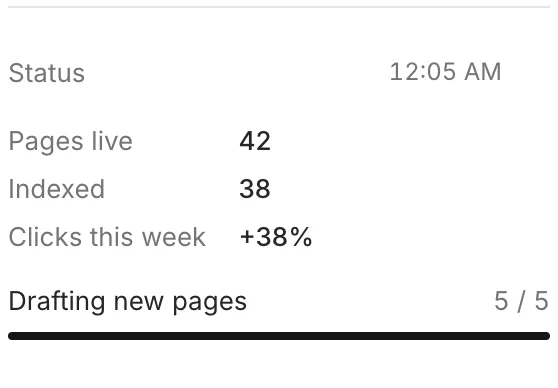
Set the status
Section titled “Set the status”rply status set replaces the status with a list of blocks. Give every block you want to update later an id:
rply status set '[ {"type":"keyvalue","id":"stats","items":[{"key":"Pages live","value":"42"},{"key":"Indexed","value":"38"}]}, {"type":"progress","id":"drafts","label":"Drafting new pages","value":0,"max":5}]'It also accepts a file path or - for stdin, which is easier for larger statuses:
rply status set status.jsonUpdate one value
Section titled “Update one value”Patch a block by its id. Only the fields you pass change:
rply status patch '{"id":"drafts","value":3}'Patch several blocks at once with an array:
rply status patch '[{"id":"drafts","value":5},{"id":"stats","items":[{"key":"Pages live","value":"47"},{"key":"Indexed","value":"38"}]}]'Read the current status as JSON with rply status get.
Use other pins
Section titled “Use other pins”status is just the conventional key. Pin as many messages as you like, each with its own key:
rply pin set overview "**3 projects** running" --title Overviewrply pin patch overview --patch '{"id":"pages","value":7}'rply pin listrply pin remove overviewrply pin set takes the same text, --title, --blocks, --image and --file options as rply send. Keys are 1 to 32 characters of lowercase letters, digits, - and _.
When the person unpins it
Section titled “When the person unpins it”People can unpin a message in the app. It then moves into the thread at the position it was first sent. After that, rply status patch (or rply pin patch) fails because there’s no pin to patch, and the next rply status set creates a new pinned message.