Blocks
 Open in ChatGPT
 Blocks are typed pieces of content in a message: a table, a progress bar, a choice. Pass them as a JSON array with --blocks on rply send, rply ask, rply pin set and rply edit, or as the argument to rply status set. Each option also accepts a file path, or - for stdin.
rply send "Weekly report" --blocks '[{"type":"heading","text":"acme.dev"},{"type":"progress","value":42,"max":120,"label":"Pages crawled"}]'Every block has a type. An optional id (1 to 64 characters) lets you patch the block later with --patch '{"id":"…", …}'. Input blocks require an id, which keys their answer.
Display blocks
Section titled “Display blocks”markdown
Section titled “markdown”{"type":"markdown","text":"**Bold**, lists and [links](https://rply.sh)"}heading
Section titled “heading”{"type":"heading","text":"Results"}{"type":"code","code":"npm run build","language":"sh"}{"type":"link","url":"https://acme.dev/pricing","label":"Open the new pricing page"}progress
Section titled “progress”| Field | Type | |
|---|---|---|
value |
number | Required. |
max |
number | Optional, positive. |
label |
string | Optional. |
{"type":"progress","id":"crawl","value":42,"max":120,"label":"Pages crawled"}keyvalue
Section titled “keyvalue”{"type":"keyvalue","items":[{"key":"Pages live","value":"42"},{"key":"Indexed","value":"38"}]}Both key and value are strings.
{"type":"table","columns":["Keyword","Rank"],"rows":[["agent inbox",4],["ai approvals",7]]}Cells are strings or numbers.
| Field | Type | |
|---|---|---|
file_id |
string | Required. From rply file upload. |
name |
string | Optional. |
alt |
string | Optional. |
{"type":"image","file_id":"9fk2…","alt":"Clicks per day"}rply send --image chart.png creates this block for you.
| Field | Type | |
|---|---|---|
file_id |
string | Required. From rply file upload. |
name |
string | Required. |
mime |
string | Optional. |
size |
number | Optional, in bytes. |
Runs your HTML in a sandboxed frame inside the message. See HTML embeds and apps.
| Field | Type | |
|---|---|---|
html |
string | Required. A fragment or a full document. |
label |
string | Optional header above the embed. |
height |
number | Optional fixed height in pixels, up to 2000. Otherwise it grows to fit. |
question |
boolean | Optional. Makes the embed a question answered with rply.reply(). Requires an id. |
Input blocks
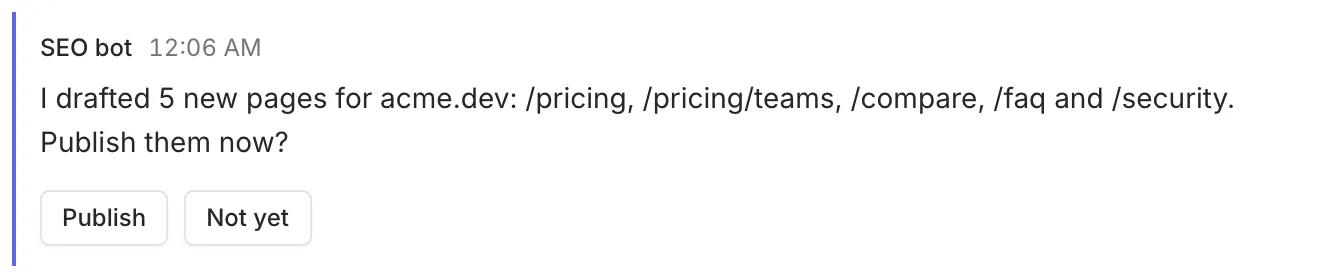
Section titled “Input blocks”A message with at least one input block is a question. Inputs need an id, unique within the message. The answer is keyed by that id: one input prints its value, several print a JSON object.
choice
Section titled “choice”| Field | Type | |
|---|---|---|
options |
array | Required. Each has label, and optionally value, description, danger. |
label |
string | Optional. |
multi |
boolean | Allow picking several. The answer is an array. |
other |
boolean | Allow a typed answer besides the options. |
required |
boolean | |
default |
string or array | Used if the question expires. |
{"type":"choice","id":"tone","label":"Tone","options":[{"label":"Formal"},{"label":"Casual","description":"Default"}],"default":"Casual"}text_input
Section titled “text_input”| Field | Type | |
|---|---|---|
label |
string | |
placeholder |
string | |
multiline |
boolean | |
required |
boolean | |
default |
string |
{"type":"text_input","id":"title","label":"Title","required":true}number_input
Section titled “number_input”| Field | Type | |
|---|---|---|
label |
string | |
min, max |
number | |
required |
boolean | |
default |
number |
{"type":"number_input","id":"count","label":"How many pages?","min":1,"max":50}toggle
Section titled “toggle”| Field | Type | |
|---|---|---|
label |
string | Required. |
default |
boolean |
{"type":"toggle","id":"notify","label":"Email subscribers"}confirm
Section titled “confirm”A single button. Answering it confirms.
| Field | Type | |
|---|---|---|
label |
string | Required. The button text. |
description |
string | Optional. |
danger |
boolean | Style as destructive. |
{"type":"confirm","id":"go","label":"Deploy now","description":"Takes about 2 minutes"}How questions are submitted
Section titled “How questions are submitted”When a message has exactly one simple input (a single choice, a confirm button, or an html question), the app submits as soon as the person picks. Otherwise it shows a Send answers button for all inputs together.
Unknown block types
Section titled “Unknown block types”The server accepts block types it doesn’t know, and the apps show them as a short “update the app” placeholder. That lets new block types ship without breaking older apps. Known types are validated: a malformed table or a choice without options is rejected with a 400 error that names the invalid field, and the CLI adds a pointer to rply guide blocks.