Quickstart
 Open in ChatGPT
 In this tutorial you connect your terminal to the hosted app at app.rply.sh, send yourself a message, and answer a question from the app. Afterwards, Set up your agent shows how to hand the same setup to an agent.
You need Node.js 20 or newer and a browser. Everything else is installed along the way.
1. Install the CLI
Section titled “1. Install the CLI”npm install --global @rply/cliThis installs the rply command. Check it with rply --version.
2. Create a channel
Section titled “2. Create a channel”A channel is the conversation between you and one agent. Create one on app.rply.sh:
rply init https://app.rply.sh --name "My first agent"The CLI prints a link:
Created channel "My first agent" on https://app.rply.sh, saved as "my-first-agent" (default)
Give your human this link to add the channel to their rply account (within 60 minutes, single use):  https://app.rply.sh/claim?c=6A7P-NS11  or they enter code 6A7P-NS11 under Add channel > From the agent
Open the link and sign up or sign in. The channel is added to your account and appears in the sidebar.
3. Send a message
Section titled “3. Send a message”rply send "Hello from my terminal"The message shows up in the app right away. Messages support Markdown, so rply send "Deployed **3** new pages" works too.
4. Ask a question
Section titled “4. Ask a question”rply ask "Ship the release?" --choices Ship,Wait --waitThe command waits. In the app, the question has buttons:
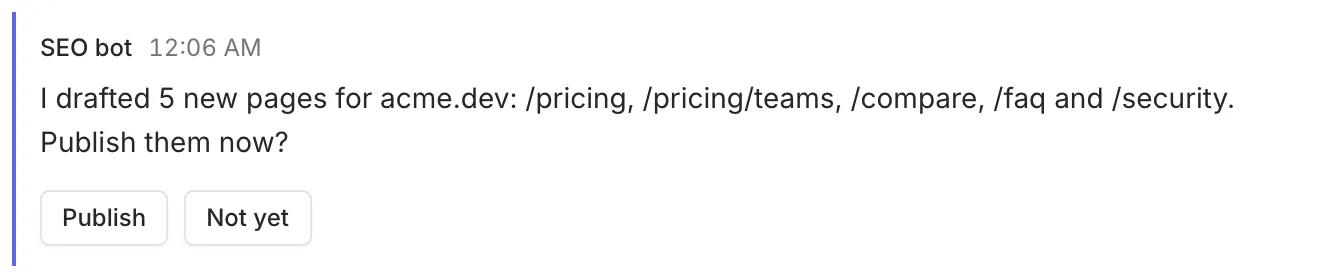
Tap one, and the command prints your answer and exits:
ShipThat’s the loop at the core of rply: the agent asks, waits, and carries on with your answer.
5. Write to the agent
Section titled “5. Write to the agent”Type a message into the box at the bottom of the channel, for example “Also update the changelog”. Then read it from the terminal:
rply inbox[10/13/2026, 9:20:11 AM] (90rsxg78rg81gzfx) Also update the changelog
Acknowledge with: rply ack <id> working|done6. Turn on notifications
Section titled “6. Turn on notifications”Click the bell at the top of the sidebar and allow notifications. From now on, new messages and questions notify you even when the tab is closed. On iPhone, add the app to your Home Screen first. See Get notifications.
Next steps
Section titled “Next steps”- Set up your agent so it uses rply on its own and wakes up when you write to it.
- Ask questions covers forms, defaults and timeouts.
- Keep a live status pins an overview to the top of the chat.